Framer SEO checklist: how to rank your Framer site on Google
A practical Framer SEO checklist covering page titles, descriptions, headings, alt text, CMS SEO fields, redirects, speed and Google Search Console.
To rank a Framer site on Google, give every page a unique title and description, use one H1 and clear headings, add alt text to images, fill in the SEO fields for your CMS pages, set redirects for any changed URLs, keep images light, and submit your sitemap in Google Search Console. Framer handles the technical basics, such as a sitemap and fast hosting, so most of the work is about your content and settings.
This checklist walks through each step in the order we use when we launch a Framer site. It takes about an hour for a small site and works for any template.
Does Framer handle SEO for you?
Partly. Framer publishes static, fast pages, generates a sitemap automatically at /sitemap.xml and serves your site over HTTPS. That gives you a solid technical foundation without plugins.
What Framer cannot do is decide what your pages are about. Titles, descriptions, headings, image descriptions and the words on the page are up to you. Those are the things Google reads to understand and rank your site.
The Framer SEO checklist
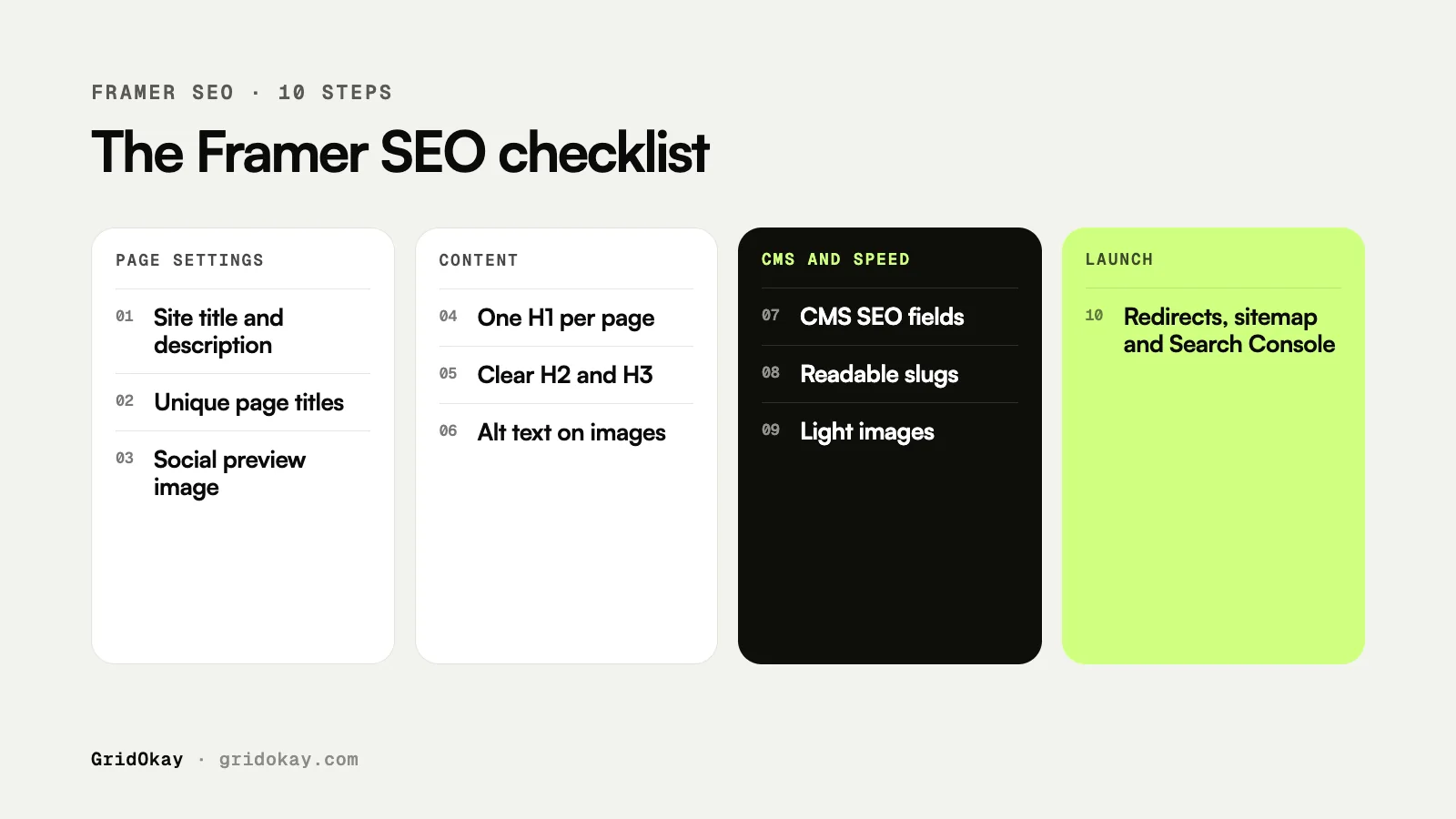
| Step | Where to do it | Why it matters |
|---|---|---|
| 1. Site title and description | Site settings | Default text for search results and sharing |
| 2. Page titles and descriptions | Each page’s settings | What people see in Google |
| 3. One H1 per page | Text tag on the main heading | Tells Google the page topic |
| 4. Clear H2 and H3 headings | Text tags | Gives the page a readable structure |
| 5. Alt text on images | Image settings | Describes images for search and screen readers |
| 6. Clean, readable URLs | Page path and CMS slugs | Easier to understand and share |
| 7. CMS SEO fields | Collection page settings | Unique titles for every blog post or listing |
| 8. Social preview image | Site and page settings | Better looking links when shared |
| 9. Redirects | Site settings | Keeps old links and rankings working |
| 10. Search Console and sitemap | Google Search Console | Gets your pages found and indexed |
How do you write good page titles and descriptions?
Every page should have its own title and description. Duplicate titles make it hard for Google to tell your pages apart.
- Titles: put the main topic first, then your brand. For example, “Wedding Photography in Leeds | Your Studio”. Keep it to about 50 to 60 characters so it is not cut off.
- Descriptions: one or two sentences, about 150 characters, that say what the page offers and why someone should click. Google may rewrite it, but a good description is often used as it is.
- Use the words your customers use. If people search for “bookkeeper for freelancers”, say that, not “financial solutions”.
How should you structure headings in Framer?
In Framer, a heading only counts as a heading if its text has the right tag. A large, bold paragraph still looks like a heading to visitors but not to Google.
- Give the main heading on each page the H1 tag. Use only one H1 per page.
- Use H2 for section titles and H3 for items inside a section.
- Do not skip levels just to get a certain font size. Change the style, not the tag.
If you use a template, check the tags once. Some sections may use H2 where your page needs the H1.
Alt text, URLs and images
Alt text. Select each meaningful image and add a short description of what it shows, such as “Two-bedroom flat living room with large windows”. Leave purely decorative images empty.
URLs. Keep page paths short and descriptive, like /services/web-design rather than /page-3. For CMS items, check that each slug reads like a few clear words.
Image size. Large images are the most common reason a Framer site feels slow. Upload images at the size they are shown, not straight from a camera. Then test your pages with PageSpeed Insights and fix anything it flags as heavy.
SEO for Framer CMS pages
If you have a blog, listings or case studies in the CMS, each collection page needs its own SEO settings. Instead of one fixed title, connect the page title and description to fields from the collection, such as the post title and its excerpt. That way every post gets a unique title in search results automatically.
Add an image field for the social preview as well, so each post shares with its own picture. Our templates come with these CMS pages already set up. You can browse them on our templates page.
Redirects and launch checks
If you rebuild an existing site in Framer, some old URLs will change. Add a redirect from each old path to its new page in your site settings. Without redirects, old links and any rankings they earned lead to a 404 page.
Before and after launch:
- Connect your custom domain if you have one.
- Publish the site and open /sitemap.xml to check your pages are listed.
- Add the site to Google Search Console and submit the sitemap.
- Use URL Inspection to request indexing for your most important pages.
- Check back after a week or two for coverage errors.
Ranking in Google also helps you appear in AI search tools. We cover that side in how to get your website into ChatGPT, Perplexity and Google AI Overviews.
Frequently asked questions
Is Framer good for SEO?
Yes. Framer sites are fast, mobile friendly and come with a sitemap and HTTPS. Like any platform, your rankings still depend on your content, titles and links.
How long does it take for a Framer site to show up on Google?
It varies. New sites are often indexed within a few days to a few weeks after you submit the sitemap in Search Console. Ranking well for competitive terms usually takes longer.
Do I need a custom domain for SEO?
You can be indexed on a free framer.website address, but a custom domain looks more trustworthy, is easier to remember and keeps your rankings if you ever move platforms.
Can GridOkay set up SEO for my Framer site?
Yes. Every site we design and build includes these SEO basics as standard. See our services or get in touch for a fixed quote.